From collectables to cars, buy and sell all kinds of items on eBay
aAdvanced Search
Export Centre
Getting Started
Best Practices
High Volume Selling
Global Trading Experiences
News & Updates
PayPal

Add Account

In order to withdraw funds from your PayPal account, you will need to add either a Singapore or a US bank account. Please follow these steps:

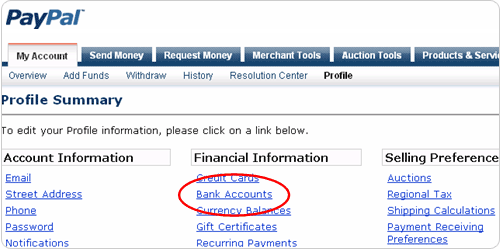
  1. Log in to your account and go to the “Profile” sub-tab of the “My Account” tab. Click the “bank accounts” link under Financial Information.


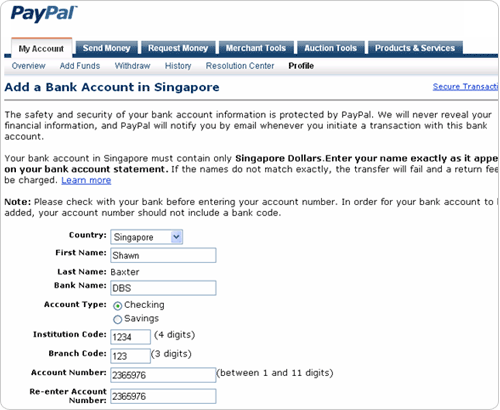
  2. Select your country. Input your banking information on our secure pages.


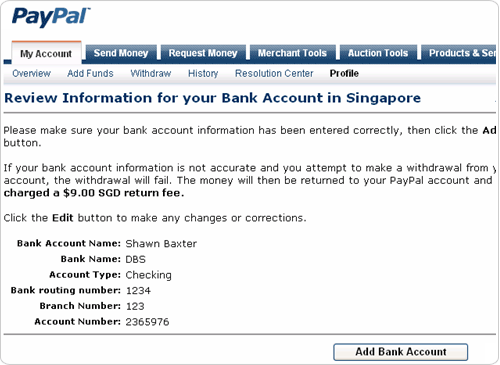
  3. Confirm your bank details by clicking ‘Add Bank Account’.


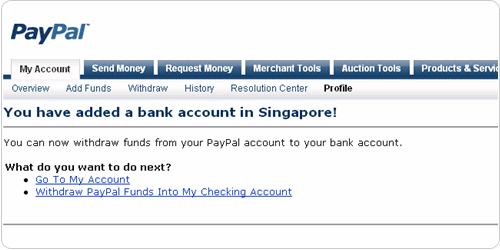
  4. Start withdrawing funds. Learn how to withdraw.


About eBay | Jobs | Announcements | Register | Security Centre | Feedback Forum | Site Map | Help
Copyright © 1995-2009 eBay Inc. All Rights Reserved. Designated trademarks and brands are the property of their respective owners. Use of this Web site constitutes acceptance of the eBay User Agreement and Privacy Policy.
eBay official time